Join
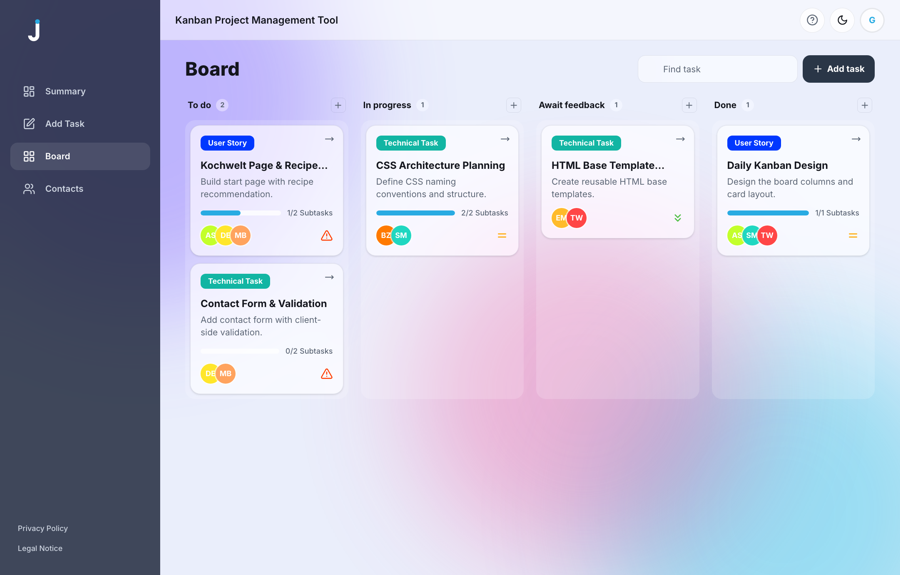
A board where a team can see who is doing what: tasks dragged between four columns, with contacts, deadlines and subtasks. The thing a company reaches for when work stops fitting into a group chat.
- My role
- Full rewrite — architecture, design, code
- Size
- ~2,400 lines, 38 components
- Stack
- React 18, Vite, Tailwind, dnd-kit
- Status
- Live, open to guests
Why it got rebuilt rather than patched
Join started life as a team project written in plain JavaScript. It worked, but every new feature meant threading changes through markup, state and styling that were never separated in the first place. Instead of tidying that up, I rebuilt the app from scratch as a React project — same idea, different foundation.
What you see here is an independent copy: the team's original repository is untouched, and the old vanilla version still sits in the project under legacy/ so the two can be compared honestly.
That is the same call a client eventually has to make about their own system, so it is worth stating plainly. A rewrite is the right answer when the cost of the next feature keeps rising; patching is the right answer when it does not. Here it kept rising.
What it does
- A board with four columns — to do, in progress, awaiting feedback, done — with cards dragged between them.
- Tasks with a category, priority, due date, assignees and subtasks you can tick off one by one.
- A summary screen that counts what is open, what is urgent and which deadline lands next.
- Contacts grouped alphabetically, with colour-coded avatars.
- Instant search across the board, sign-in, and a light and dark theme that remembers the choice.
On a desktop it is a sidebar layout; on a phone the navigation moves to the bottom of the screen, within thumb reach.
The hard part: drag and drop that is not a trap
Dragging cards is the feature everyone asks for and the one that quietly breaks the app for part of its users. A mouse-only drag is unusable with a keyboard, awkward with a screen reader, and on a phone it fights with page scrolling — every attempt to move a card scrolls the board instead.
So the drag is built on dnd-kit, and it is not the only way to move a task:
- On touch a drag starts on press and hold, so an ordinary swipe still scrolls the page.
- Every card also carries a “Move to” menu. It reaches the same result with one tap or with the keyboard alone — no dragging involved.
A gesture should never be the only route to an action. If dragging is the sole way to move a card, then anyone on a keyboard, a screen reader or an unsteady hand simply cannot use the board.
A data layer that works with or without a backend
All storage sits behind one file, backend.js. It exposes plain functions — load everything, save a task, delete a contact — and the rest of the app never learns where the data actually lives.
Underneath there are two implementations. If a Firebase address is set in the environment, everything goes to the Realtime Database over REST. If it is not, the same calls fall back to localStorage, and on first run the app seeds itself with demo data so the board is never empty on arrival.
This is worth more than it sounds on a client project. The demo can be handed to anyone without setting up infrastructure first; nothing has to be registered before the client sees their own product working. And when a real database is needed, it is one environment variable — not a rewrite of every screen.
What I would tell a client before they use it
Two limits, stated up front rather than discovered later:
- Sign-in is a demo, not security. Accounts are checked in the browser, which is enough to show the flow and nowhere near enough to protect real data. Anything with actual users needs authentication on a server.
- On
localStoragethe data is per device. That is fine for a demo and wrong for a team: two people would each see their own board. Shared work is exactly what the Firebase mode is for.
Neither is hard to close — they are deliberately left where they are, because this is a portfolio piece rather than a system in production.
Press Guest log in to go straight to the board — no account needed.